
No digital marketing budget? No problem. Thanks to free digital marketing tools available today, you don’t need much money. These resources help you produce amazing digital marketing programs. Find out how you can do more with less.
Yes, you can create a digital marketing strategy on a shoestring budget.
You can improve your website performance using free tools. These tools help increase conversions. They fine-tune user experience (UX).
You can create better content with them. They also prevent website spam.
Understanding why these are important helps you optimize your website.
In this blog article, we will explore how to allocate an existing marketing budget. We will examine how this can grow your digital capabilities.
We’ll discuss utilizing free digital marketing tools and browser extensions to achieve a higher return on investment (ROI).
We will also explore making minor digital marketing adjustments to optimize your success.
Finally, we’ll cover optimizing digital content assets for search engines and all devices.
Let’s first start with what a shoestring budget looks like.
What does a digital marketing shoestring budget mean to you?
Does it mean less than $50,000? Less than $100,000? Or less than $250,000? Whatever it means to you, it can happen for less than $100,000.
Really? How is that possible?
A winning digital marketing strategy starts with a vision
Your strategic planning process should begin with the vision and how you will communicate it. Communicating your digital marketing strategy is just as important as creating it. It is only as good as you articulate it, communicate it and execute it.
Everyone thinks they are a digital marketing expert. It’s important to demonstrate that you are the true expert.
Communicate your strategy simply and concisely
An effective way to communicate your strategy is to put it on a single slide or page. The Corporate Executive Board (now Gartner) provides an example of a good strategy on a page template.

This one slide or one-page document should have the following:
- A digital marketing strategy timeline (in years)
- A digital marketing strategy statement (one to two sentences max)
- The current state of digital marketing
- Top 5 digital marketing initiatives
- Top 5 underlying beliefs and assumptions about digital marketing
- The state of digital marketing in one to two years
Shifting the budget to digital marketing
At Forsythe Technology, we shifted our traditional marketing. We moved to digital marketing by launching a new thought leadership website.
This website is called Forsythe FOCUS Magazine.
Why was the creation of this website so important? It created a “content hub” for all of our digital marketing programs. The website has our subscription page, so we can continue the conversation via email.
It helped us with our subscription strategy for building our email list. We moved our content online and then created more “exclusive” digital content you couldn’t find in the print magazine.
The power of a thought leadership website
Then, we gradually moved our audience to our digital thought leadership website.

We equipped our field teams with content from our thought leadership website. They interact the most with our clients and prospects.
We promised our field teams we would produce at least one piece of content a month. In other words, they would have 52 pieces of content to promote to their clients and prospects each year.
This simple goal stretched us but didn’t push us too far. We could create weekly content, but didn’t have the resources to make daily content.
Setting expectations
We set expectations for our audience, sales team, and employees. Don’t overwork your marketing team and stretch resources beyond your means. It also collects more data on what articles were the most popular and shared.
We made the trending article data transparent to our users. We created a section that showed daily which articles were the most popular and shared.
We learned more about our audience than we could have ever via print.
10 key areas of digital marketing
You should review and optimize 10 categories of digital marketing. This will help you maximize the value of your digital marketing budget. They are the following:
- Website
- Landing Pages
- Search Engine Marketing (SEM)
- Content Marketing [Blogging, Webinars, Podcasts, Videos]
- Search Engine Optimization (SEO)
- Online Reputation Management
- Email Marketing
- Social Media Marketing
- Visual Marketing
- Productivity Tools
Let’s start with the easiest and the place most organizations should start: your website.
1. Website
Your website is one of the most effective (and least difficult) places to start with your digital marketing efforts.
In addition to email marketing and search engine optimization (SEO), your website is an excellent platform to maximize the return on your marketing investment.
Your marketing team can easily execute on it. Your website also significantly impacts the return on investment (ROI) of your digital marketing activities.

Plus, your website is a digital marketing channel that is expected to get more budget.

So where do you start when it comes to your website? Find out what your target audience (and Google) wants from your website. They want it to be fast and mobile-friendly.
How fast is your website?
The speed of your website affects the key metrics you care about in digital marketing. The bounce rate of your website. Your search rankings, conversions, and page views. The satisfaction of your visitors.
Site speed is a factor in Google’s algorithm and where your website ranks.
Google expects your website to load in 2 seconds or less.
While site speed is just one of 200 Google ranking factors in Google’s algorithm, it is an important one. A faster load time usually equals a higher ranking in Google.
It also means your website will provide a better visitor experience since most users don’t stick around for more than 60 seconds.
In other words, your website loading time impacts your bottom line because users say when they’ve encountered a website that was too slow to load, 73 percent of users leave the website.
What tool can help you with speed time?
Google Page Speed Insights is a free tool for making websites fast on all devices.

Beyond being fast, Google requires you to be mobile optimized.
Is your website mobile-friendly?
The next step in optimizing your website is to make it mobile-friendly. What tool can help you with that?
Google Mobile-Friendly Test is a free tool from Google. It will test if your web pages are mobile-friendly. It also checks if they meet Google standards.

Think reCAPTCHA not just CAPTCHA
First, address those two areas. Then, it is critical that you handle the people you don’t want on your website. They will skew your data. The SPAM and the SPAM bots. How do you get rid of that?
First, you don’t use CAPTCHA.
What is CAPTCHA?
CAPTCHA is a system intended to distinguish humans from machines to get rid of SPAM.
But we, humans, had trouble with CAPTCHA as this cartoon describes.

As a result, Google has killed CAPTCHA with reCAPTCHA.

reCAPTCHA by Google is where we, humans, don’t have to input anything at all. We just check a box and Google verifies we are human. No more looking at numbers or letters like you do with CAPTCHA.
Average annual budget: Depending on what agency or developer tool you use, you could do this for under $15,000.
2. Landing pages
The next digital marketing area where you can optimize your limited budget is landing pages.
A landing page is a section of a website that is designed to get traffic from various sources and prompts users to take some sort of action.
Generally, there are two types of landing pages.
Click-through landing pages (aka click through to another page) and lead generation landing pages (capture user data such as a name and email address). By optimizing your landing pages, you can boost the conversion rate of nearly any digital marketing campaign or program you are running.
How can you optimize your landing page?
Start with A/B testing
One of the best examples is Jason and how he A/B tested his contact icon. He replaced the icon with his headshot to see if more people would contact him.

It worked. He had 48 percent more conversions.
Keep your users focused
When you give people too many options, it becomes difficult for your users to choose an option and make a choice.
So, it important to learn from the paradox of choice because too many choices make us more paralyzed and more dissatisfied.

Less is more.
Don’t give people too many options. Promote one thing on your landing page.
Your landing page should focus on a single purpose where you help your users make the right decision, increasing your conversion rates.
Use great visuals
We respond to visual content more quickly, as 90% of the information that reaches the brain is visual. Studies show that visuals are processed faster than text.
Also, people remember 80% of what they see and do. They remember only 10 percent of what they hear. They recall 20% of what they read.
Video and photos are crucial to the success of landing pages (and your overall digital marketing efforts).

Avoid common pitfalls
There are a lot of good and bad examples of landing pages.
There are some common mistakes that people make.

And 10 remedies that you should do to fix your ineffective landing pages.

Use tools with easily-editable templates
In addition to the common pitfalls of landing pages, it is important to have templates for your landing pages that will help you create them quicker and are mobile-friendly.
One of those tools to help with templates is called Knak.

This tool integrates with two standard marketing automation systems: Eloqua and Marketo.
Use a heat map to see how your users interact with your landing pages
A heat map is a popular conversion optimization tool. It provides visual representations and summaries of data.
A good example of a heat map tool is hotjar.com.

This tool provides real-time analytics to help digital marketers see which content is the best performing and the ability to adjust on the fly.
Average annual budget: Depending on what agency or developer tool you use, you could do this for under $10,000.
3. Search engine marketing (SEM)
Search engine marketing or known as SEM is a combination of SEO and pay-per-click (PPC) marketing to get more visibility to your website.
One of the critical foundation parts of SEM has become Google My Business.

Google My Business allows you to create and verify your company’s locations on Google so you show up on page 1 in Google Search and your business is included in Google Maps.
Google My Business is important because SEO and SEM are shifting toward local. For example, you can update Google My Business right there by typing your company name.
It is also critical for location extensions in Google AdWords.
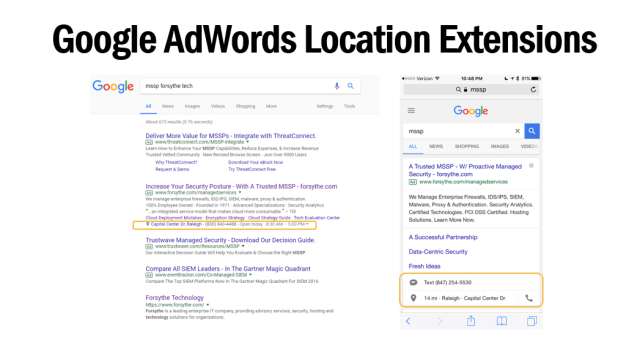
One of the most popular PPC avenues is Google AdWords. The other is Bing Ads. Read this case study to see which provides you the most value.
According to a study on where marketing professionals in the United States are going to increase their budget, PPC ranks toward the top, alongside social media marketing and mobile marketing.

Remarketing
In addition to search campaigns, one of the best parts of Google AdWords is remarketing because it targets people who have already visited your websites with ads.

Remarketing, also known as retargeting, can significantly increase your conversion rates and ROI because it targets users who are familiar with your company. These users are more likely to become customers or take action on your website.
Google TAG Manager
To manage your conversions on Google AdWords, one of the best ways is through Google TAG Manager.

Google TAG Manager helps digital marketers and outside agencies make tag management simple and easy.
You can place, update, and manager code snippets or tags in one place, speeding up the development of your website and work better with outside agencies to ensure your conversions are set up to track your overall PPC efforts.
Google Analytics
Another way to track conversions is through Google Analytics and goals. Four goal types are critical to your success. One of the most underappreciated reports in Google Analytics regarding goals is Reverse Goal Path.

It helps you understand how your visitors complete or don’t complete certain actions on your website such as subscribe to your email list.
Linking Google accounts
To maximize your SEM efforts and your overall digital marketing efforts, it is important that you link all your Google tools together.

Linking all your Google tools together, you can a total view of all your efforts and Google provides you with more data once they are linked. You can see how one Google tool success impacts the success of the other Google tool.
Average annual budget: Depending on how much you spend on Google AdWords, you could do this for under $15,000.
4. Content marketing [blogging, webinars, podcasts, videos]
Content marketing is the next area where you can live on a shoestring budget. Tactics include blogging, webinars, podcasts, and video.
Your approach to content marketing
As Progressive CMO Jeff Charney says, your brand should have “the breadth of ESPN, the innovation of Netflix, and the original content programming of HBO.”

Brands are becoming media companies so it is important to keep up with the news of the day and the trends in your industry, with technology and with business.
One of the best ways to understand word trends is through Google Trends.
Google Trends
Google Trends helps you see the latest trends, data, and visualizations.

It shows you how often a search term is entered in Google.
Blogging
Blogging is the foundation of your content marketing efforts. In fact, 80 percent of B2B marketers and 75 percent of B2C marketers use blogging for their content marketing efforts.
One of the tools that can give you content ideas and more is BuzzSumo.

It provides you information on how well content is performing and what topics are resonating with readers so you can write blog posts that on topics that are trending.
It is also good for identifying influencers interested in your content. Another tool to help you identify influencers is call NinjaOutreach.
Once you have identified the topics and the influencers you want to write about and work with, it is critical to bring them in consistently with hooks.
Write compelling headlines
With most people just reading headlines, it is important to make sure your headline and sub-headline capture the essence of your content.
Analyze your headlines using free keyword research tools. And use one of my favorite tools to analyze the strength of your headlines: CoSchedule Headline tool.

It analyzes your headlines and gives you a 1 to 100 score. And then it gives you tips on how to write better headlines.
Better formatting
Most people skim articles and don’t read to the end. That is why formatting your blog posts are so important.
Just like with graphic design, white space is essential. The same goes for the text.

Readers need somewhere to rest their eyes and a good blog layout leaves plenty of blank space.
Make sure your blog posts are not busy or distracting so you can increase engagement and make sure your readers read to the end.
Improve your readability
It is vital to create content that is easy to read. Have you read content that used big words? Was it easy to scan and quickly comprehend?
Without easy-to-read content, your content marketing approach will most likely fail. Readability ensures that Google ranks your website high in search results.
Figure out how well your content reads by using the readability score tool.

Your content should be at an 8th-grade reading level.

This grade level can bring complex ideas to audiences who read at a lower reading level.
The best writers write the simplest.
It should more than just simple, it needs to be interesting and compelling.
Add read time
In addition to headlines, readers should understand how long articles are before they start reading.
Why should you add read time?

Adding read time increases engagement. Please don’t take my word for it.
Look at Fast Company, Medium, and HubSpot. They all include read time.
How did this trend start?
You can thank The New Yorker.
“The more we know about something — including precisely how much time it will consume — the greater the chance we will commit to it.“
The New Yorker
Now you need to add the estimated reading time to your blog. How do you calculate the estimated reading time?
If you use WordPress, you can use plugins or code snippets that automatically calculate it for you. If those options don’t work, you can manually add it to your blog articles.
Research varies, but generally, a person reads between 200 and 250 words per minute. So, if you write a 2,000-word blog post, it will take 8 to 10 minutes to read.
Pick a word count and use it. You can round up or down. It’s your call.
First, create your own content. Then, grow the reach of your blog with guest blogging opportunities.
Guest blogging
Another free content marketing tactic is guest blogging. Becoming a guest contributor on a popular website is a great way to establish credibility and increase brand awareness.
Publications are looking for new contributors. However, each website has different requirements and instructions for guest contributors or bloggers.
To help you save time on sorting through the requirements, here is a list of 10 websites on how to be a guest contributor. This will also aid in gathering information.
Speaking of blogs, one of today’s top marketing blogs is HubSpot’s marketing blog.
HubSpot blog
HubSpot recently redesigned their blog. One of the primary reasons they made the change was to incorporate more videos, images, and podcasts into their editorial strategy.
There are 10 key takeaways from this redesign that apply to your blog.

Ensure you can embed podcasts into your blog posts. Explore creating short video recaps of blog posts. Consider producing a video of your most popular blog posts. HubSpot also added functionality for large block quotes. They said more video content and added related articles. In addition, they added Slack and Facebook Messenger share buttons.
HubSpot also added functionality to filter its blog post photos. They implemented a bar that scrolls at the top as you read the article. They added read time and optimized their blog for different devices.
With so much great content available today, content curation can help fill the gap. Many lack the time, staff, and budget to consistently publish original content. Content curation provides consistent content to your audience.
Content curation
What is content curation? Content curation involves the action of a person finding and sharing the best of other people’s content. Unlike computers, people perform this task. It is similar to a museum curator sharing the best art in an art museum. It is also like a wedding DJ playing the best songs at a wedding.

Content curation efforts are crucial to ensuring the success of your content marketing initiatives. If you are unsure about content curation, explore the 7 key benefits. Check out 5 free resources to save you time.
One of my favorite resources for content curation is SmartBrief. They provide executive summaries each day of the most relevant news. These summaries keep you up-to-date with the latest news and information. They have more than 200 niche email newsletters.
Webinars
Marketers give webinars one of the highest ratings for effectiveness as a content marketing tactic. Webinars are an excellent way to showcase your high-quality content and establish yourself as a thought leader in your industry.
Using tools like Go to Webinar can help you organize webinars correctly. They also bring value to your audience.

Webinars should be included in your content marketing mix. They deliver value. They position your company’s subject matter experts as thought leaders. Webinars help you subtly sell. They keep your audience engaged. They help you generate and qualify leads.
Podcasts
Podcasts are another useful content marketing tactic. Six in 10 Americans are now familiar with the term “podcast”. Additionally, 40 percent of Americans 12 years old and above have listened to a podcast.
Using tools like Libsyn can help you host your podcasts.

You can launch a podcast with a limited budget and little time.
Videos
Video accounts for more than 50% of digital data online, and demand is growing daily. More people prefer video over images or text, reflecting user patterns.
A video is a suitable alternative if you don’t have time to write a 2,000-word article to fight for attention. One of the top locations for watching videos is YouTube, the second-largest search engine in the world.
YouTube channel
Make sure your company has a robust YouTube channel. Find out the five ways you can improve your YouTube channel. In addition to those five tips, there are three critical steps you should take when it comes to your YouTube channel.
After you log in to your YouTube channel, go to the “Advanced” section under “Channel,”and make sure you do these three actions:
- Link your YouTube channel to your Google AdWords account
- Add your main company website to the associated websites
- Add your Google Analytics property tracking ID
In addition to posting your videos to YouTube, you may want to consider hosting them on Wistia. This is a paid service. You could also use Vimeo, which is a free service.
Average annual budget: Depending on what tools you use, you could do this for under $40,000.
5. Search engine optimization (SEO)
One of the best areas for seeing the return on investment (ROI) with your digital marketing efforts is SEO. This area is crucial. SEO is the practice of optimizing websites for search engines and improving their rankings.
Why is SEO important?
Search engines have bots or spiders. They crawl the web to discover new and updated pages. These are added to their search index. Google’s spider is called a Googlebot.
Search engines have become more sophisticated. Google uses machine learning for its search algorithms. Yet, they can’t see and understand web pages like a human can. SEO helps search engines determine the content of each web page. It also helps determine how useful the web page is to users.
Search engines provide millions of results to users seeking answers to their questions. SEO is about improving the user experience, making it faster, more user-friendly, and easier to navigate.
Website traffic
A majority of website traffic comes from organic (not paid) search.

In fact, organic search drives 51 percent of website traffic.
According to Google, B2B researchers do 12 searches prior to engaging with a company.

You need to optimize for search engines. Ensure your brand is the first that clients and prospects think of. Be present when they are searching for a remedy to their questions or problems.
How do you optimize for search engines?
It starts with understanding that Google’s primary goal is to accomplish the searcher’s task.

Huh? Search task accomplishment? What is that? Google learns from user behavior every time a user performs a search. They want to give users answers to what they were searching for.
How does that impact you? Your goal with SEO is to figure out what your audience wants. Do your best to help them get it.
Understanding the Google Knowledge Graph
It starts by understanding Google’s Knowledge Graph. The Knowledge Graph is Google’s own database, where data has been collected from tons of Google searches. Google makes certain information quickly and easily available to searchers.
You see the Knowledge Graph on the right-hand side of a search engine result page or SERP. For example, I typed into Google: Charlotte Digital Summit.

On the right-hand side, I see information about that event.
Why is Knowledge Graph important?
Google aims to provide accurate and relevant information for your search queries as quickly as possible.
This has given rise to position 0 or the featured snippet.
What is a featured snippet? A feature snippet appears in approximately 13 percent of search results, but the number is rising. These featured snippets appear above the normal search results, which is why they are called position 0. They fall above position 1.
Position 1 is no longer the best spot
Ranking position 1 is no longer the holy grail of SEO.
The snippet contains a “snippet” of content from a relevant and helpful web page to quickly answer the searcher’s query. I typed in “how to network at a conference.” I received 6 steps on how to be successful.

So, how does your company’s website become a feature snippet or get to position 0?
Make sure your website answers search questions
You should do what Marcus Sheridan did. He is best known for his revolutionary marketing strategy of answering his customers’ questions.

Image source: Jay Paul for The New York Times
To answer your client and prospects’ questions, review your Google Search Console data. You can learn how to set up your Search Console.
You can increase your website traffic by 28%. How does one start? Improve the web pages that don’t receive many clicks and enhance the ones that do.
Google Search Console
Go into your Google Search Console data. Look for keywords that have a high impression count. Identify those with a low click-through rate and a small number of clicks.

Then, fix and maximize your title tags and meta descriptions. Find keywords that are working. Add them to your Google AdWords Keyword Planner to maximize your organic and paid search efforts. Then add them into your content, especially your title tags and meta descriptions.

If that doesn’t help you enough, then you need to fix your content marketing process.
Ensure your content answers frequently asked questions (FAQs)
How do you know what questions your clients and prospects are asking?
Start with your sales team and your social selling efforts.
- What questions are they getting asked?
- Do you have a database of those questions?
- Are you creating content to answer those questions?
You can also use websites like Quora to do research on what questions are being asked.

You can type potential questions into Google to find answers. Consider what they might be asking. Then, scroll to the bottom of the search results. Look at the “searches related” section at the SERP’s bottom. For example, consider the related searches for ‘cloud vs. colocation’.

Tools to help you
You should also fix your technical SEO page issues using tools like SEO Site Checkup.

You should also fix the broken links in your content using tools like Ahrefs’ broken link checker.
Both tools will help you enhance your user experience, boost website traffic, and increase conversions. To truly enhance your user experience, consider moving away from PDFs.

Why move away from PDFs?
PDFs are clearly not the best option for SEO. PDFs are not optimal for Google and you. As a webmaster, your users can’t reach other pages on your website. These pages are related to the information in the PDF. You can’t optimize the images for search in a PDF. You can’t apply structured data to them. Search engines use structured data to generate snippets.
As search engines move toward snippets, your PDFs are holding you back from reaching position 0.
Transition away from PDFs to resolve issues related to version control on the latest PDF. Instead, move the information from the PDFs to web pages. If you want to eliminate PDFs, start by converting them into slide decks.
PDF to PowerPoint Converter
By using a PDF to PowerPoint Converter, you can turn those PDFs into slide decks to start.

And then eventually move them over to HTML pages.
Average annual budget: Free if you do it all on your own and use free online tools.
6. Online reputation management
A crucial aspect of your digital marketing success is managing your company’s online reputation. With online reputation management, you monitor search engine results pages. You address mentions in online media or web content. You also mitigate them. It will help you overcome bad negative reviews about your company or highlight good ones.
How does one start with online reputation management?
Start by Googling the different variations of your company’s name. Ensure you review the top 5 pages of search engine results accurately.

You then create accounts to protect your brand search results.
Online review websites
What are some online review sites that you should consider creating?

Depending on whether you are a business-to-business (B2B) or business-to-consumer (B2C) company, or both, you should examine various sites. Consider sites like CrunchBase, G2 Crowd, Glassdoor, Amazon, LinkedIn, and Google reviews. Also look at Reddit, Twitter, Yelp, Indeed, OpenTable, TripAdvisor, and Angie’s List. Other sites include Zomato, Yahoo Local, Better Business Bureau, Trust Radius, Facebook, and the Salesforce AppExchange.
This is not an exhaustive list, but just some of the more well-known review sites you should monitor, track, and manage.
Google Alerts
Make sure you use Google Alerts to monitor the web for real-time news and information.

NameChk
Another helpful tool to manage your online reputation and make sure you don’t become a victim to cybersquatting is Namechk to see if your organization’s name is available on a social network or a website domain.

Average annual budget: Free if you do it all on your own and use free online tools.
7. Email marketing
Email marketing is a must for a successful digital marketing strategy. It is an inexpensive tactic. We still live in our email.
Email is not dead. In fact, 89 percent of marketers say email is their primary channel for lead generation.
The rise of mobile
One of the trends we are seeing is the rise of people opening emails on their mobile phones. Recent research says that 55 percent of opens are now on mobile.
How can a company increase email opens? Start with the email subject line. Use tools like Zurb TestSubject to test how your emails appear on mobile devices.

In addition to a tool, you should understand the fundamentals of good email subject lines.
What are the characteristics of the best emails?
They create a sense of urgency and pique your curiosity. They provide a call to action. These messages are personalized with your name or interests. They are relevant to the news of the day or month. They come from someone or a company that you know. Finally, they tell stories.

Email marketing is easy, effective and inexpensive.
Average annual budget: Depending on what email software program you use, you could do this for under $15,000.
8. Social media marketing
Social media marketing is another inexpensive tactic for your digital marketing efforts. To help you develop your social media strategy, remember the 7 Cs.

You should also create a social media maturity model on how you are going to roll out social media to your company. For example, I created this social media maturity model.

And finally, focus on one social media channel.
To maximize your LinkedIn channel, ensure each company page post is effective. Include links to other companies mentioned in the article. Use no more than three hashtags. Include a shortened URL. Make sure you have a large image and a compelling headline. Also, ensure your content is optimized with metadata. This allows your employees to share it via their LinkedIn and other social media networks.
What is metadata?
Metadata is data for web pages that contains descriptions of a page’s content and its keywords linked to the content. Metadata is one of the most overlooked areas of social media marketing. However, it is crucial for ensuring your content gets more clicks, views, and shares.
So how do you optimize your metadata?
For Facebook and LinkedIn, make sure your web pages use The Open Graph protocol. You can include metatags on your web pages. These metatags tell Facebook and LinkedIn what headline you want to feature. They also specify the description and the image.
You can use tools like the Social Media Optimizer tool. This will ensure your metadata is correct. It should follow the Open Graph protocol and Twitter cards requirements. Additionally, you can enable Google rich snippets.

Average monthly budget: Free if you do it all on your own and use free online tools.
9. Visual marketing
You should focus on visual marketing in your digital marketing strategy. It is time to rethink your strategy and plan. Why? You get 94 percent more views of your content with images.

And people remember it. If a relevant image is paired with the same information, people retain 65 percent of it. They remember three days later. They remember three days later.
Unfortunately, many organizations use subpar stock images in their content. Luckily, there are many websites with beautiful images. They can help your content “pop” more. These images also make it more memorable.
These free image websites utilize the creative commons zero (CC0) license. This license indicates ownership rights have been waived, so no attributions are needed.
Pixlr X
Once you get the perfect image for your piece of content, how do you modify it? How do you ensure it fits well into your content?

You don’t need to purchase a license to Adobe Photoshop. You can use an online image editor like Pixlr X to resize and crop images via your web browser. You can apply a quick fix to the image, add creative effects, and add borders.
You can also use tools like Canva and Pablo to create engaging images for social media networks.
Average monthly budget: Free if you do it all on your own and use free online tools.
10. Productivity tools
There are numerous digital marketing tools available today. One of the biggest challenges digital marketers face is finding the right set of digital marketing tools.
To maximize your and your team’s digital marketing efforts, it starts with the right web browser. My recommendation is to use Google Chrome. Why? Because there are many useful Chrome extensions.
Chrome extensions
Chrome extensions are small software programs that can enhance the functionality of the browser.

There are many browser extensions in the Chrome Web Store but there are three must-have extensions. They are Hootlet, Grammarly, and WhatRuns.
- Hootlet helps you quickly shrink links and share content via Hootsuite.
- Grammarly helps you check spelling and grammar when you are creating web content.
- WhatRuns provides x-ray vision for web design and helps you find technologies used on any website you visit.
Average monthly budget: Free if you do it all on your own and use free online tools.
Bringing it all together
It is important to start small and grow your digital capabilities slowly over time by shifting your marketing budget from traditional to digital. You can do all these digital marketing tactics for under $100,000. It is possible to create a digital marketing strategy on a shoestring budget.
Start with your strategy on a page and your maturity models. And concentrate on your website first.
Explore and bookmark free tools and extensions. Link all your Google accounts together to get more data from Google. Protect your online presence by setting up accounts with the main online review websites.
We are all media companies today so it is important to think like the media do by producing compelling headlines and make sure your blog is readable for everyone (aka an eighth-grade reading level).
Answer questions with your content because SEO is going to position 0, becoming more local and moving away from PDFs. And don’t forget to optimize your visuals everywhere you have an online presence.
What tips would you add to overcome a shoestring digital marketing budget?
Joins my email newsletter for a free eBook and more helpful insights.
Comments are closed.